Agent commissionsEvery plan
Your agents paid without a spreadsheet, each seeing only their own sales
Rate rules, geographic zones, approval and payments: the commission is calculated on each sale, approved, paid and found on a PDF statement. The agent logs in to their own area.
In thirty seconds
- Three types of rule A percentage, a fixed amount or tiers.
- Approved before being paid Each commission is pending, approved or rejected, then paid.
- One area per agent The agent logs in and sees only their own sales and commissions.
What you gain
What you gain
Manufacturers, wholesalers, houses that work with representatives: the end of the month-end spreadsheet and of statements redone by hand.
Clear zones
Country, region, department, city or custom zone: each agent has their territory.
A PDF statement per agent
The detail of their commissions, ready to send.
Payments tracked
What has been paid, when, and what is still owed.
Strict separation
An agent cannot view another agent’s sales.
Step by step
A commission, from sale to payment
Example: an agent covers three departments, with a rate that rises above a sales threshold.
The rule
Rate, fixed amount or tiers, per agent and per zone.
The sale
The commission is calculated on the agent’s sale, according to the rule of their zone.
The approval
You approve or reject each commission.
The payment
The payment is recorded and the PDF statement is generated.
On screen
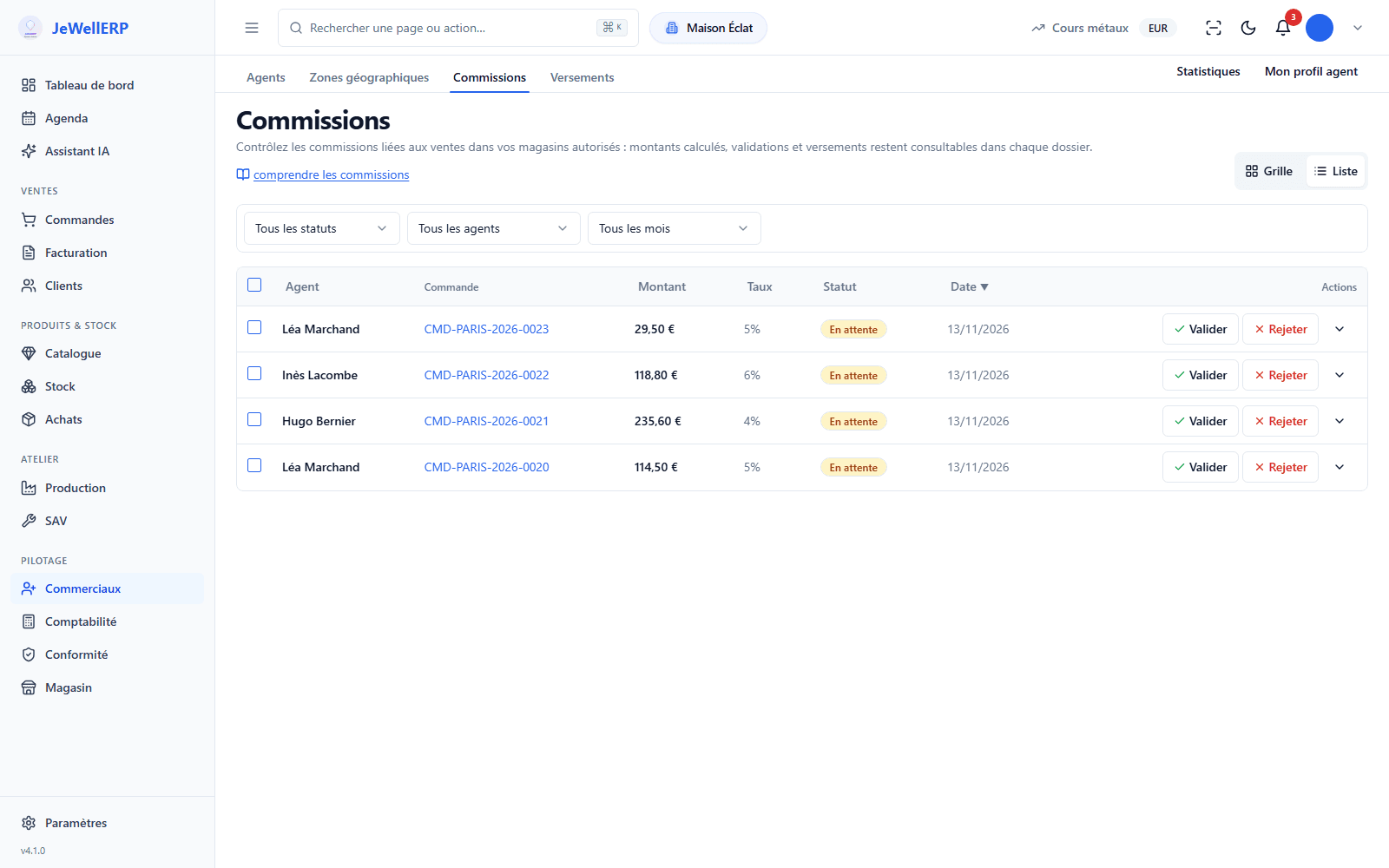
The month’s commissions
Four commissions pending in the demonstration shop: you approve or reject each one.
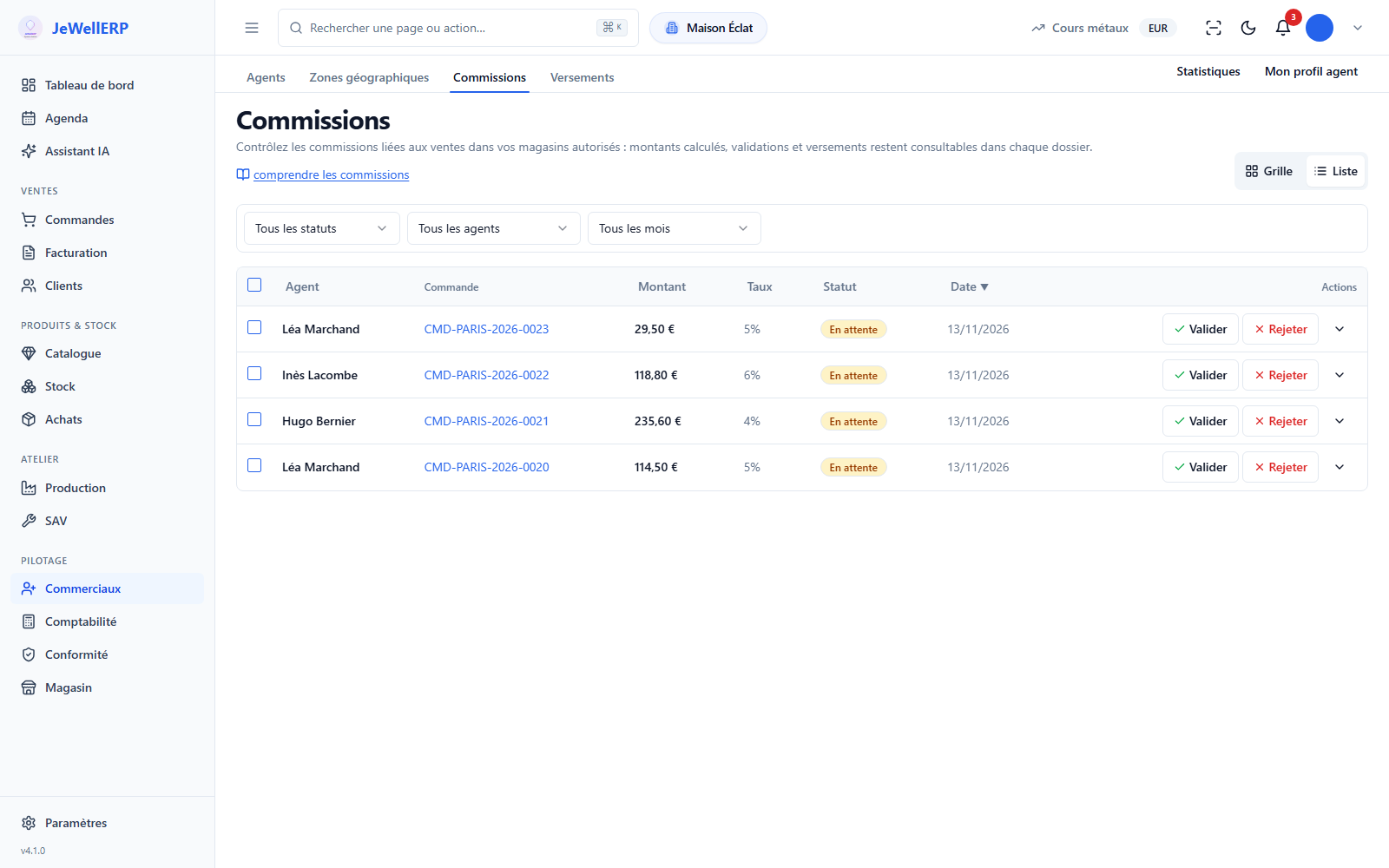
On this screen
In detail
Commissions in detail
- The commission is calculated on the sale amount including VAT, excluding shipping costs.
- Calculation on margin is not offered.
- Percentage, fixed amount or tiers.
- One rule per agent, per zone or both.
- Country, region, department, city or custom zone.
- Each payment is recorded, and the commissions concerned move to “paid”.
- Each agent’s bank details are kept on their record.
- The agent’s PDF statement details their commissions, ready to be sent to them.
- A statistics tab tracks each agent’s activity.
- A login specific to each agent.
- They see their sales, commissions and payments, nothing else.
Scope
What JewellERP does, and what it does not do
What it does
- Calculates the commission on each sale according to your rules.
- Has each commission approved before payment.
- Produces a PDF statement per agent.
- Opens for each agent an area that shows only their own sales.
What it does not do
- It does not calculate commission on margin.
- It does not transfer the money: it records the payment you make through your bank.
Questions
Your questions
The rate changes when the agent’s sales cross the thresholds you set. You define as many tiers as needed.
As long as it has not been paid, you reject it. It stays on record with its status, and no longer appears in the payments to prepare.
As many as you like: users are unlimited in both plans.
See an agent’s area
Rule, sale, approval, payment and PDF statement: the complete journey, then the agent’s own view.
Next feature: JewellERP AI Assistant